
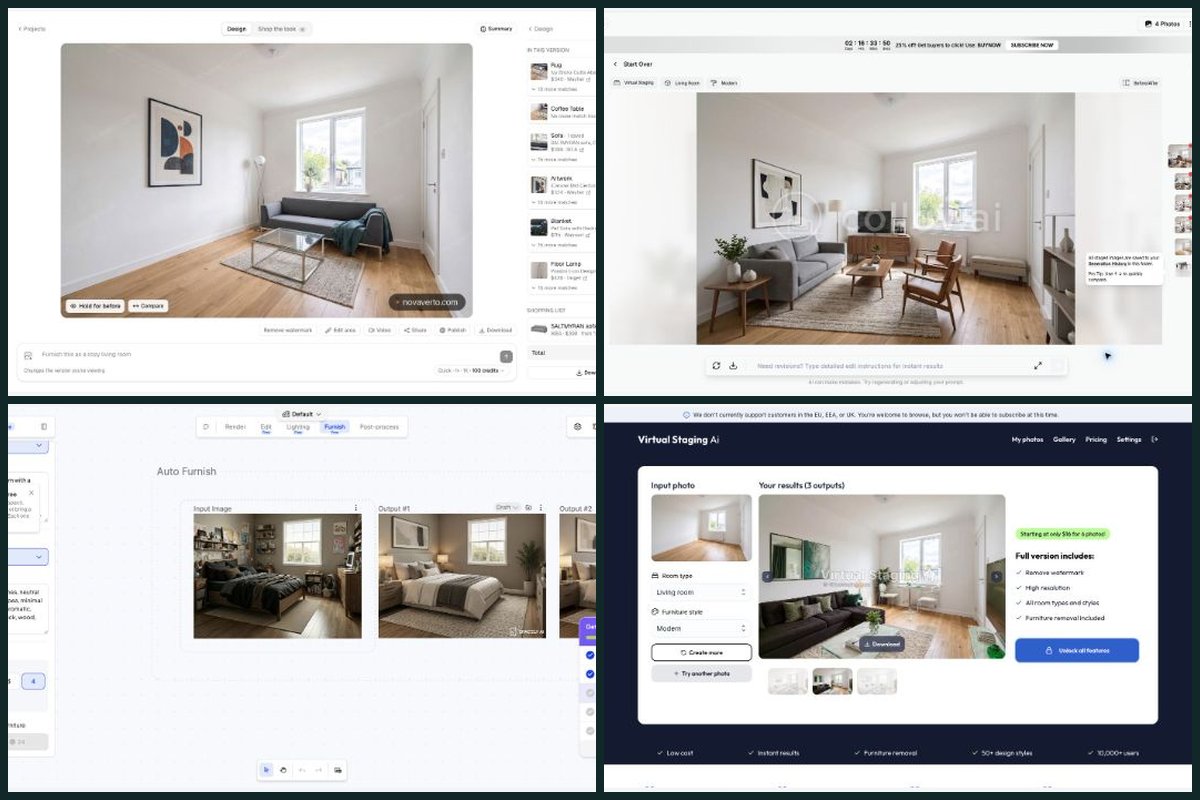
I wanted to get past the polished before-and-after pictures. A nice room is a good start. But what happens when I want a different sofa, warmer walls, another AI model, or an actual list of things I can buy?
That’s where I think NovaVerto makes its strongest case. I can start with a room photo, explore a design, work on the details, compare versions and move into furniture shopping in the same workspace. The latest update makes those steps much easier to see.
I’m a co-founder of NovaVerto, so there’s an obvious connection here. This is my take on the workflow I want from an AI home-design tool, backed by the earlier browser tests and a fresh look inside NovaVerto’s logged-in app.
This comparison covers eleven alternatives: RoomGPT, Interior AI, REimagine Home, Collov AI, Spacely AI, HomeDesigns AI, Paintit.ai, Remodel AI, MeltFlex, Decor8 AI and Virtual Staging AI. It is a selection from that research, not a ranking by active users. Decor8 and Interior AI reached subscription gates; the other nine alternatives had completed renders in the September record.
Read each comparison separately
Each page compares NovaVerto with one competitor, with its own functionality table, pricing context and source notes.
- NovaVerto vs RoomGPT — From a quick room idea to a complete design project
- NovaVerto vs Interior AI — The model, the next edit and the shopping list in one place
- NovaVerto vs REimagine Home — Why I prefer a mix of conversation and direct room controls
- NovaVerto vs Collov AI — A home-design project that goes beyond the listing photo
- NovaVerto vs Spacely AI — Why I prefer NovaVerto for a photo-based home makeover
- NovaVerto vs HomeDesigns AI — Broad toolkits, compared through the workflow I actually use
- NovaVerto vs Paintit.ai — Conversational edits with the room controls beside them
- NovaVerto vs Remodel AI — A clearer place to keep developing the renovation idea
- NovaVerto vs MeltFlex — Why the shopping step decides this comparison for me
- NovaVerto vs Decor8 AI — A design workflow I could inspect from the first render to the shopping list
- NovaVerto vs Virtual Staging AI — From furnishing a listing photo to planning the room I want to live in
The functionality comparison I actually care about
I’m giving most of the attention to the jobs I do after the first image: choosing a model, refining a room, keeping track of versions and finding furniture. NovaVerto’s column shows exactly what I could find in the current product.
Several competitors overlap with it. My reason for preferring NovaVerto is how these capabilities come together around one project.
| Functionality | NovaVerto | RoomGPT | Interior AI | REimagine Home | Collov AI | Spacely AI | HomeDesigns AI | Paintit.ai | Remodel AI | MeltFlex | Decor8 AI | Virtual Staging AI |
|---|---|---|---|---|---|---|---|---|---|---|---|---|
| Whole-room redesign | Yes — Modern room generated; new Redesign flow inspected. | Tested | Advertised | Tested | Tested | Tested | Tested | Tested | Tested | Tested | Paywalled | Tested |
| A clear starting brief | Yes — Room, 23 styles, palette and budget; custom descriptions. | Seen (free plan) | Advertised | Tested | Tested | Tested | Tested | Tested | Tested | Tested | Advertised | Tested |
| Model choice | Yes — 11 model families, search, filters and visible credit costs. | Seen (free plan) | Advertised | Not found (free plan) | Not found (free plan) | Not found (free plan) | Advertised | Tested | Not found (free plan) | Tested | Paywalled | Unconfirmed |
| Cost control before running | Yes — Live credit estimate beside model, speed, size and variants. | Tested | Advertised | Seen (free plan) | Tested | Seen (free plan) | Tested | Tested | Tested | Tested | Advertised | Advertised |
| Focused walls, floors and details | Yes — Walls, floor, lighting, windows and doors in the inspector. | Not found (free plan) | Advertised | Advertised | Advertised | Advertised | Advertised | Tested | Advertised | Advertised | Advertised | Advertised |
| Reference and furniture guidance | Yes — Reference images; up to four furniture pictures/catalogue pieces. | Not found (free plan) | Advertised | Seen (free plan) | Not found (free plan) | Advertised | Advertised | Tested | Seen (free plan) | Advertised | Paywalled | Unconfirmed |
| Version and comparison workflow | Yes — Original plus version history, Hold for before and Compare. | Not found (free plan) | Advertised | Seen (free plan) | Seen (free plan) | Seen (free plan) | Not found (free plan) | Tested | Seen (free plan) | Advertised | Paywalled | Tested |
| Specialist jobs in the room workflow | Yes — Touches → More tools: 28 tools within the project. | Tested | Advertised | Advertised | Advertised | Advertised | Advertised | Advertised | Advertised | Advertised | Advertised | Tested |
| Staging and clearing a room | Yes — Virtual Staging and Declutter & Repair in the tool picker. | Not found (free plan) | Advertised | Tested | Tested | Tested | Advertised | Advertised | Advertised | Tested | Advertised | Tested |
| Outdoor design coverage | Yes — Exterior, garden, outdoor planner, balcony and front door. | Seen (free plan) | Advertised | Advertised | Advertised | Advertised | Advertised | Advertised | Advertised | Advertised | Advertised | Unconfirmed |
| Real-product shopping | Yes — Retailer matches and saved list; current Pieces/List UI inspected. | Not found (free plan) | Advertised | Seen (free plan) | Not found (free plan) | Not found (free plan) | Advertised | Advertised | Seen (free plan) | Tested | Paywalled | Unconfirmed |
| Shopping details in the workspace | Yes — Offers per piece, prices, list total and area re-selection. | Not found (free plan) | Paywalled | Seen (free plan) | Not found (free plan) | Not found (free plan) | Advertised | Advertised | Seen (free plan) | Tested | Paywalled | Unconfirmed |
| Video / presentation extensions | Yes — Video action on the render; walkthrough API documented. | Not found (free plan) | Advertised | Not found (free plan) | Advertised | Seen (free plan) | Advertised | Unconfirmed | Not found (free plan) | Advertised | Paywalled | Unconfirmed |
| Team and automation options | Yes — Standard API; MCP; Enterprise pooled credits and roles. | Not found (free plan) | Paywalled | Advertised | Advertised | Advertised | Advertised | Advertised | Advertised | Advertised | Advertised | Advertised |
| Specialist edge: CAD integration | No — No native CAD plug-in; the public API and MCP server are the integration routes. | Not found (free plan) | Advertised | Not found (free plan) | Not found (free plan) | Edge | Advertised | Unconfirmed | Not found (free plan) | Unconfirmed | Unconfirmed | Unconfirmed |
| Specialist edge: repeated staging | Yes — Runs spend credits according to the selected configuration. | Tested | Advertised | Advertised | Edge | Tested | Advertised | Tested | Advertised | Advertised | Advertised | Advertised |
Tested = I ran it, in the September trial or the 3 October revisit. Seen / Not found (free plan) = what the free account showed on 3 October; not found there does not mean the paid product lacks it. Advertised = documented by the vendor, often on higher plans. Paywalled = my trial stopped at a subscription screen. Unconfirmed = I could not establish it either way. Edge = a specialist case where I would pick the competitor. NovaVerto’s column was checked in the logged-in app on 3 October. Evidence and official product links are in each comparison below and in the source notes. This table compares workflow coverage, not a controlled image-quality score.
NovaVerto: my top pick for all-around AI home design
Website: novaverto.com
We built NovaVerto around the steps that come after “that room looks nice.” The current workspace is much closer to that idea: the room, the brief, the edits and the shopping details are all part of the same project.
The new-design flow starts with the job
The new-design entry now opens three routes: Redesign, Place furniture and Run a tool. In the logged-in build I inspected, the buttons were labelled New project for a fresh start and New run inside an existing project.
That distinction is useful. A full redesign lets me choose the room, style, palette and budget. Place furniture lets me work with catalogue pieces or furniture pictures. Run a tool takes me straight to a specific job, such as repainting walls or staging a room.
There’s also a sensible difference in the starting image. The Redesign dialog says it starts again from the original photo so styles don’t stack. Furniture placement and tool runs build on the version on screen and become the project’s next version. I like being told that before I press Generate.
“More tools” makes the broader toolkit practical
Under Touches, I found Refresh decor, Decorate for an occasion and More tools — 28 tools. Opening the last option keeps me in the project and gives me the tool’s own settings.
These include lighting, layout, style transfer, kitchen and bathroom design, walls and paint, floors, wallpaper, windows, doors, exterior and garden design, balcony ideas, virtual staging, decluttering and floor-plan-to-3D concepts. The public catalogue has 31 named tools; the workspace picker offers 28 photo-based tools. Those are two different counts, not 59 separate features. NovaVerto tool catalogue
For example, Walls & Paint offers ten finishes, from painted walls, limewash and Venetian plaster to microcement, brick and wood panelling, plus a color picker and hex-color field. That is the kind of control I want when I already like the room and only need to make one decision.
I can choose the model without leaving my room
The model picker goes well beyond a simple Quick-or-Pro choice. I inspected 11 model families, with search and filters for speed, quality, 4K support and new options.
Labels shown in the current picker: NovaVerto AI, Gemini, GPT Image 2.5, FLUX.2, Meta Muse, Seedream 5.0, Qwen Image 3, Grok Imagine, MAI-Image 2.6, Riverflow 2.5 and Recraft 4.1.
The app also puts the credit estimate alongside the render controls. NovaVerto AI showed 65 credits. For the Gemini setup I inspected, Fast showed 126, Balanced 149 and Best 176 credits at 1K. Size and variant settings can change the total. These are the app’s displayed model names and estimates, not a claim that I benchmarked every provider.
For me, that’s a useful advantage: I can explore with the inexpensive option, then try another model on the same project when I want a different result. I can make that choice with the cost visible.
The design has somewhere to go next
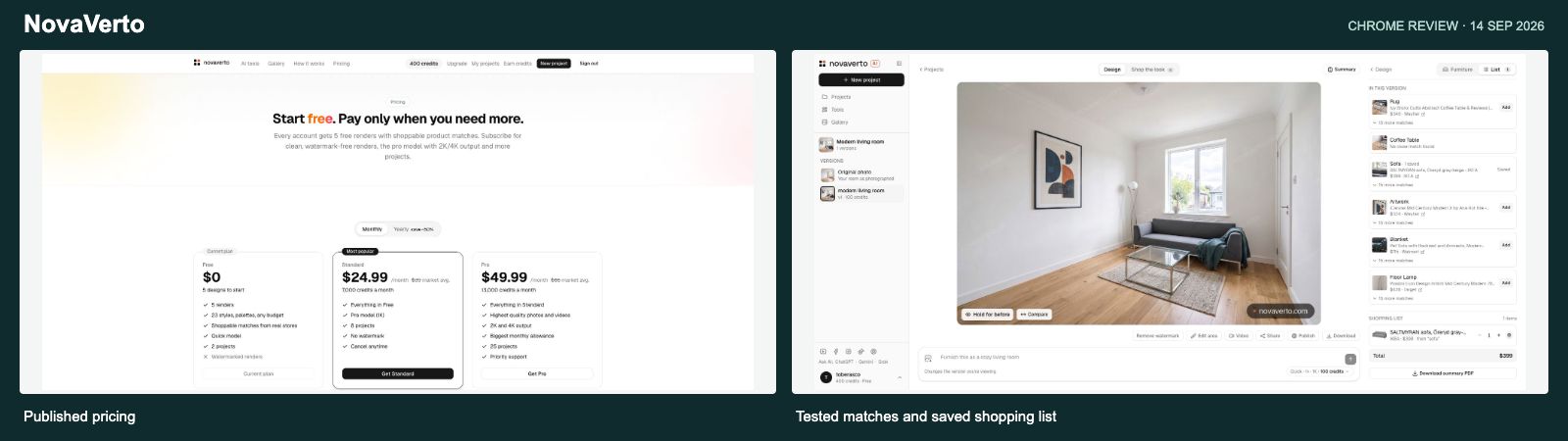
The workspace separates Catalogue, Pieces and List. I can inspect furniture offers, see prices, keep a shortlist and review its total. The furniture-placement setup accepts up to four selected catalogue pieces or furniture pictures, with options to keep the surroundings as they are or tidy and blend around the pieces.
In the earlier trial, I generated a modern living room and saved a $399 IKEA sofa from the shopping results. On this revisit, the saved list was still visible. The current interface also lets me re-select an area when a detected item does not produce a close match. I would still check dimensions, availability and product similarity before buying; this is a useful search starting point.
Version history, Hold for before, Compare, download and the visible Video action extend the same workspace. I inspected the controls again; I did not spend credits rerunning every new tool or model.
My take: NovaVerto is my all-around pick because it connects the whole-room idea, the smaller edits, model choice and the shopping follow-through. That combination is what I want to keep using once the novelty of the first render has worn off.
How I’d compare the eleven alternatives
The individual tests below come from the original September review. I’ve kept those observations separate from the product pages checked again on 3 October.
RoomGPT: a quick room idea, with less of the follow-through I want
Read the full NovaVerto vs RoomGPT comparison →
Website: www.roomgpt.io
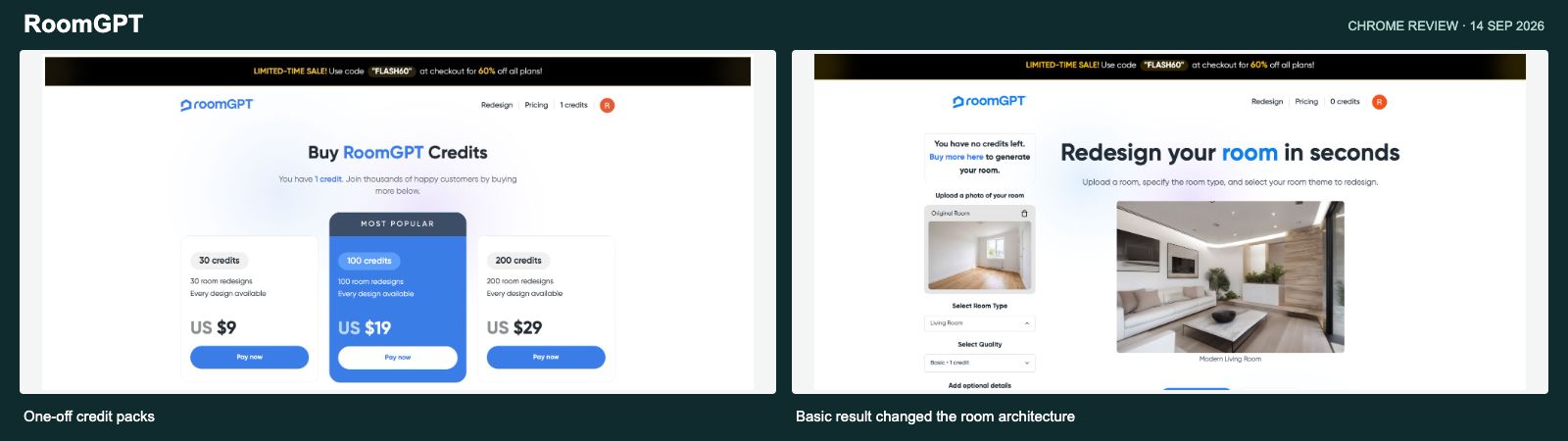
RoomGPT gave me a straightforward path: choose a room type, pick a style and generate. In the original trial, signup supplied one free credit. The editor defaulted to Pro, which needed two, so I switched to Basic/Legacy and completed a Modern living-room render.
The result looked like a plausible design idea, but it changed the room significantly. The narrow room became wider, the windows changed and extra glazing appeared. That observation applies to the Basic result I tested; I did not generate with Pro or Ultra.
What makes me choose NovaVerto for a longer project is the next step. I have the original photo, version history, focused controls, several model families and a shopping list together. The optional prompt was disabled in the September Basic trial; the current zero-credit account also left it disabled, without establishing paid-tier access. I found no equivalent shopping workflow in the free views I inspected.
The September purchase screen showed $9 for 30 credits, with Basic, Pro and Ultra using one, two and four respectively. I could reopen the official purchase page in October, but its pack values were not exposed in the retrieved page, so those amounts remain dated reference prices. RoomGPT credit packs
I signed back into the existing free account on 3 October. The editor still offered Basic, Pro and Ultra, and Outdoor Patio was in its room-type menu. The account had no credits left. Its optional-details field was disabled in that state, so this revisit does not establish which paid quality tiers accept custom prompts. I found no shopping, separate surface-edit or saved-project entry in the editor and account menu I inspected; I could not inspect a fresh result. That narrower scope matters when comparing it with NovaVerto’s visible project and shopping controls.
Why I prefer NovaVerto: I can keep developing the room and turn a visual direction into specific edits and a furniture shortlist.
Interior AI: broad rendering claims, with the useful extras split by tier
Read the full NovaVerto vs Interior AI comparison →
Website: interiorai.com
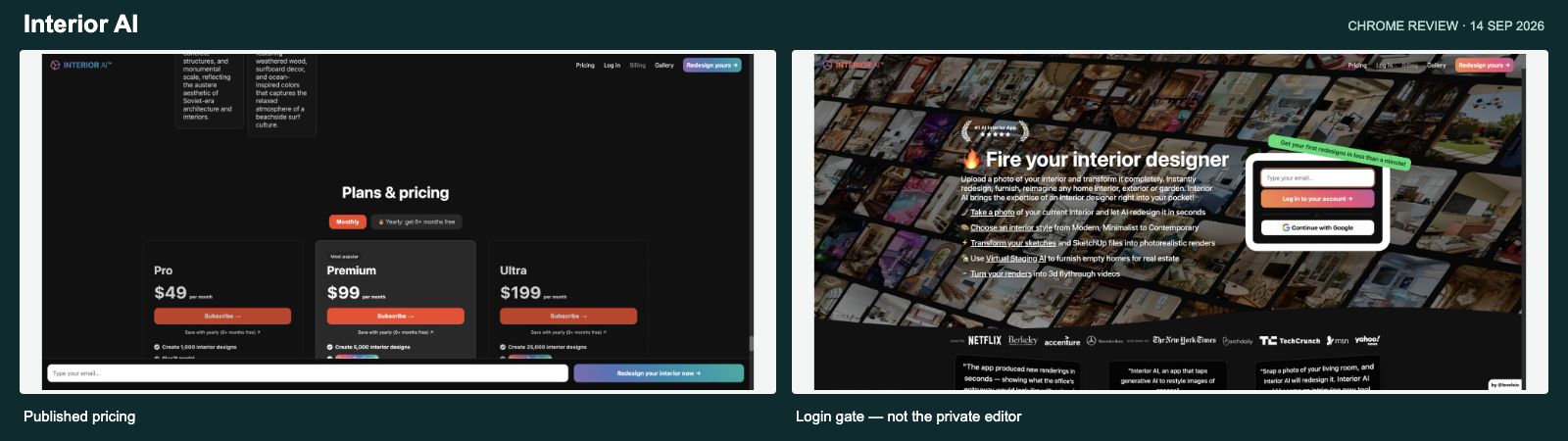
Interior AI advertises room, exterior and garden concepts, sketch and SketchUp rendering, walkthrough videos and immersive worlds. It covers a lot of ground. Its current monthly cards list Pro at $49 for 1,000 designs, Premium at $99 for 5,000 and Ultra at $199 for 25,000. Editing, staging, wall painting and several presentation features appear on Premium. Interior AI features and pricing
I checked the email login again on 3 October. Its email link opened the Pro, Premium and Ultra subscription choices, each with a Subscribe button. I could not reach a free editor to inspect the offer/list workspace or team and API controls. Those entries are marked “Paid access required to verify”; the gate does not establish whether the features exist. I still cannot give you a firsthand Interior AI output-quality comparison.
My preference for NovaVerto is about how I choose and refine a result. The current model picker lets me see named alternatives and their credit costs in the project itself. The room’s brief and individual details are visible beside the image, and the shopping list is part of the same flow.
A large monthly allowance can look compelling, but I would compare the actual model and editing tools I intend to use. Interior AI’s entry plan explicitly uses a different model from its higher tiers. A headline image count doesn’t settle that decision.
Why I prefer NovaVerto: the current room workspace gives me a more useful basis for choosing the next render: the model, the job, the price and what I plan to buy.
REimagine Home: close in ambition, with a different starting point
Read the full NovaVerto vs REimagine Home comparison →
Website: www.reimaginehome.ai
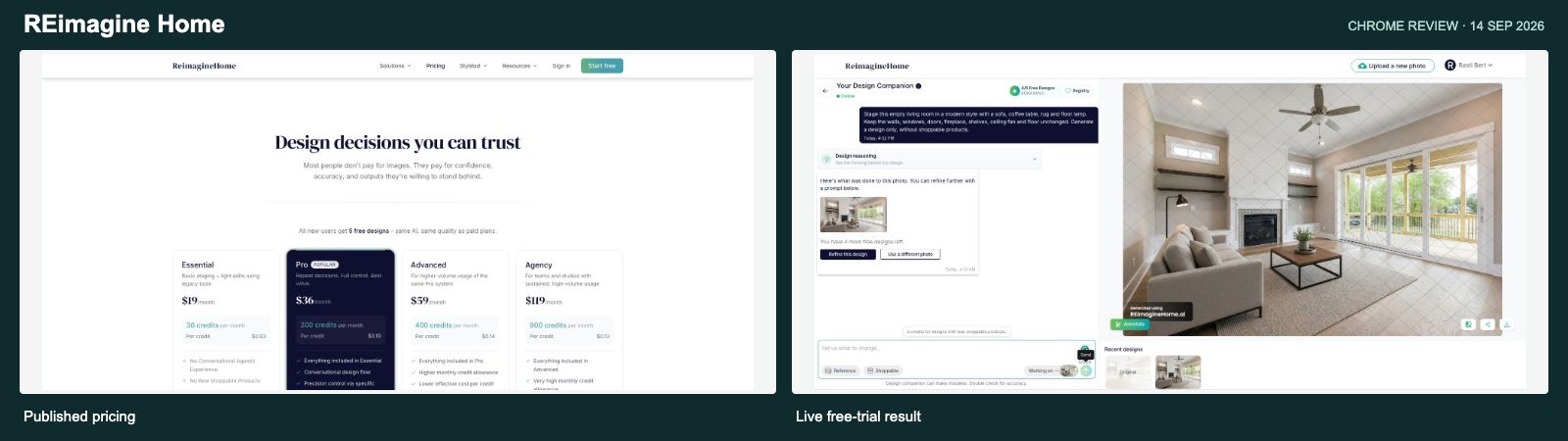
REimagine Home is a serious comparison because it also connects design with real products. Its current Pro offer lists conversation, references, incremental editing and product discovery. Essential remains the legacy tier and explicitly excludes that newer workflow. REimagine Home plan differences
In September, I used its sample empty room and asked for a modern living room while preserving the windows, doors, fireplace, shelves, ceiling fan and floor. It produced a useful furnished result for one credit. The output carried a repeated watermark.
The reason I still lean toward NovaVerto is the choice of how to work. I can type a change, open a structured Walls & Paint control, select catalogue furniture or start a full redesign. The current source-photo explanation and version list make those different jobs easier for me to follow.
REimagine Home’s current website also advertises shoppable sets and retailer checkout. I haven’t tested that end-to-end, and I wouldn’t claim shopping is unique to NovaVerto. REimagine Home product workflow
The signed-in revisit on 3 October recovered the September project with four of five free designs remaining. I opened the reference chooser, which accepts up to three photos from uploads, previous designs or the inspiration gallery. Working on offered Original and Design 1; Registry opened a saved-product panel, and Shoppable mode displayed a two-credit cost. These are real workflow overlaps. NovaVerto remains my preference for its dedicated furniture-placement route, direct room controls and named-model choices. I did not execute product matching or find a video/CAD control in the inspected free views.
Why I prefer NovaVerto: its mix of direct controls, a broad model picker and a visible project structure suits how I move between big ideas and small changes.
Collov AI: listing photos are the center of the experience
Read the full NovaVerto vs Collov AI comparison →
Website: collov.ai
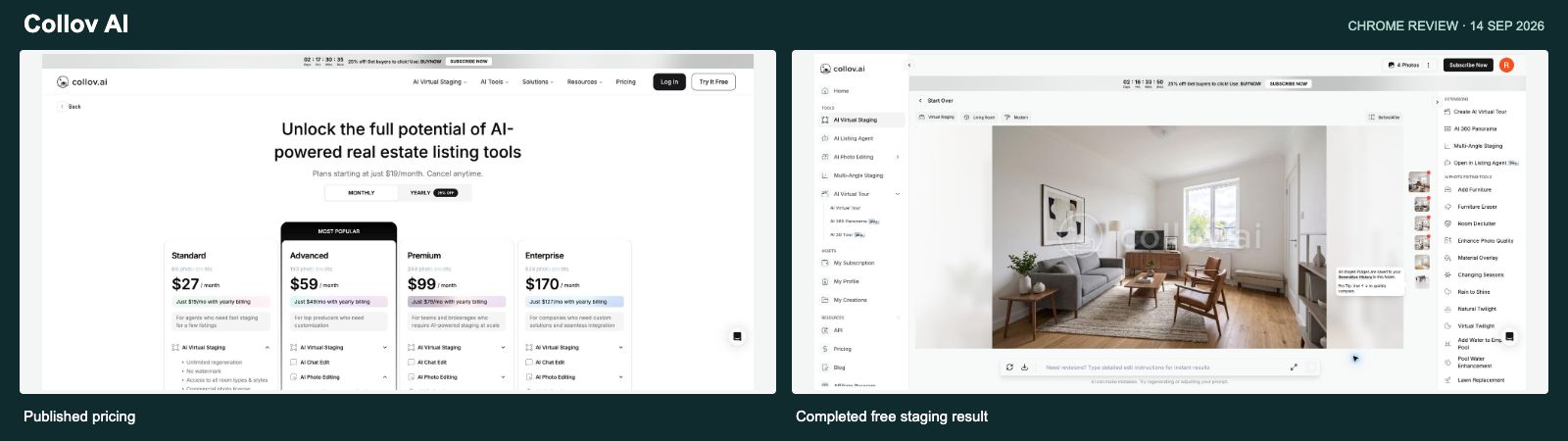
In my September trial, Collov returned four furnished versions of the shared empty-room photo while reducing the allowance by one photo. The result I inspected kept the window, radiator, door and floor recognizable. I had switched off an unnecessary furniture-removal option before starting.
The current product pages emphasize staging, multi-angle consistency and property-photo edits such as material changes, twilight, weather and lawn replacement. These are relevant listing tools. Collov product features
NovaVerto is the one I prefer for my broader home project. I can use it to explore the room, refine finishes, try model alternatives and collect furniture offers. Those buying decisions matter to me alongside the final picture.
This is one of my two specialist exceptions: Collov’s advertised included staging regenerations per source photo can be a better fit when an agent needs repeated furnishing options for the same listing image. That does not make its photo allowance directly comparable to a single-render credit price. Collov staging allowances
On 3 October I reopened the original four-result project in the Free account. My Creations, Generation History and Before/After were available, and the comparison view worked. Add Furniture opened a style selector and written prompt. I did not find a named-model picker, retailer offers or a saved shopping list in the home, result, Add Furniture or navigation views I checked. That is the practical distinction behind my NovaVerto preference for shopping and model choice; it is not a claim about every paid Collov feature.
Why I prefer NovaVerto overall: I want to work through the design and purchasing decisions as well as prepare the room image.
Spacely AI: a studio-oriented canvas, while I want the home project together
Read the full NovaVerto vs Spacely AI comparison →
Website: www.spacely.ai
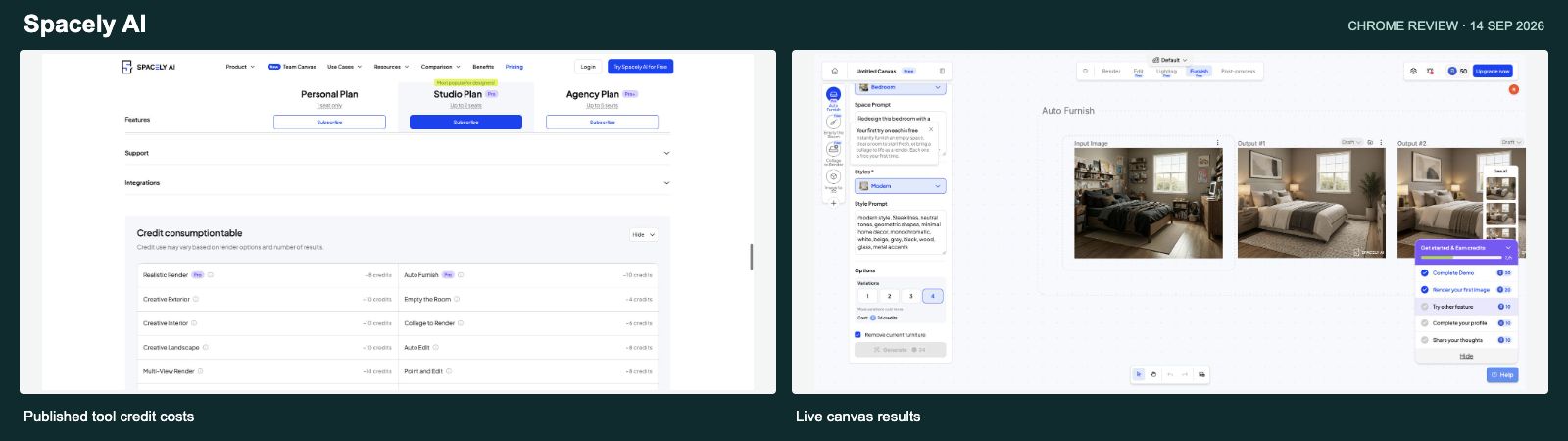
Spacely produced four bedroom concepts in the earlier test using its supplied sample. I selected a Modern preset, furniture removal and four variations. The output was coherent and the room remained recognizable.
I also had to pay attention to how the selected operation changed the estimate. One Auto Furnish variation showed five credits; the removal-plus-four-output setup showed 24. That experience is why I like NovaVerto’s current estimate sitting next to the model, speed, size and variant settings.
My second specialist exception is Spacely’s advertised SketchUp extension. If a studio already works inside SketchUp, rendering from that environment is a better fit than moving screenshots between tools. Its website also describes a shared Team Canvas. I did not test the extension or team collaboration. Spacely’s studio and SketchUp workflows
For a photo-based home project, I prefer NovaVerto’s guided starts and the connection between the room, focused edits and real-product offers. I don’t need to make a design canvas my main working environment to explore a sofa, paint color or balcony concept.
The free-account revisit on 3 October recovered the original canvas and its four results. I also opened Image to Video Beta: it offered an eight-second silent video, one image or first-and-last frames, presets or a prompt, and a 50-credit Generate control. I did not render a video. The current Auto Furnish setup showed 10 credits for its selected settings. I found no retailer-product matches, offers or saved shopping-list panel in the inspected home, tool catalogue, furnishing form or saved-result menus. That leaves NovaVerto’s shopping workflow central to my preference, while acknowledging Spacely’s video controls.
Why I prefer NovaVerto overall: it puts the controls I need for a home makeover and the shopping follow-through close to the result.
HomeDesigns AI: broad coverage, but I prefer NovaVerto’s current workspace
Read the full NovaVerto vs HomeDesigns AI comparison →
Website: homedesigns.ai
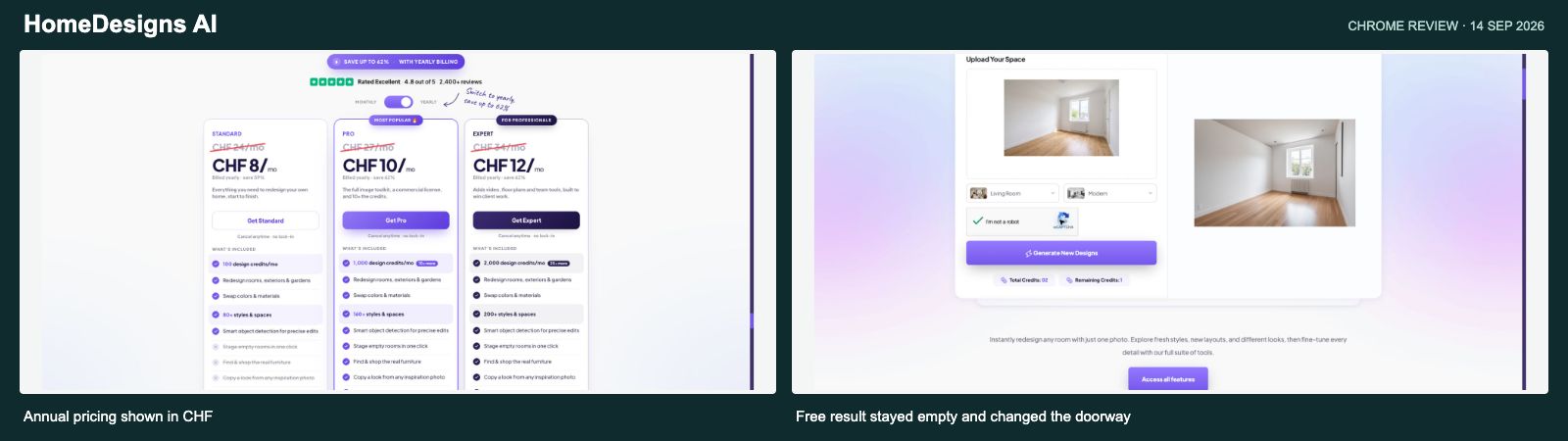
HomeDesigns AI is another broad toolkit. Its current site lists redesign, paint and material changes, precise edits, furniture removal, Furniture Finder and Design Transfer; Expert adds advanced tools such as video and floor plans. HomeDesigns AI tools and plans
My original test used its separate free tool. It accepted the same empty-room photo and spent one credit on a Modern restyle. The output stayed unfurnished, and the right-hand doorway changed. That was the free redesign mode, not its paid staging tool, so I would not generalize that result to every mode.
The difference I care about is how quickly I can get to the next useful action. In NovaVerto, More tools opens from the room’s Touches section, the chosen tool shows its settings, and the next result stays in the project. I can also choose a model and inspect shopping offers from the same working context.
The current free HomeDesigns page still exposes a much smaller set of controls than the broader product descriptions around it. It is worth comparing the actual workflow and plan, rather than counting style names. HomeDesigns AI free editor
I checked the no-login free editor again on 3 October. It exposed the upload, room/style selection and generation/result area, but no saved-project or version-history view. The original trial had not created a private account, and the login page required credentials. NovaVerto’s visible history is therefore a verified reason for my preference; this check does not establish that HomeDesigns lacks history in its private workspace.
Why I prefer NovaVerto: the room, task settings, model choices and shopping panels make a connected workflow I could inspect directly.
Paintit.ai: conversational editing, while NovaVerto adds the controls I want beside it
Read the full NovaVerto vs Paintit.ai comparison →
Website: paintit.ai
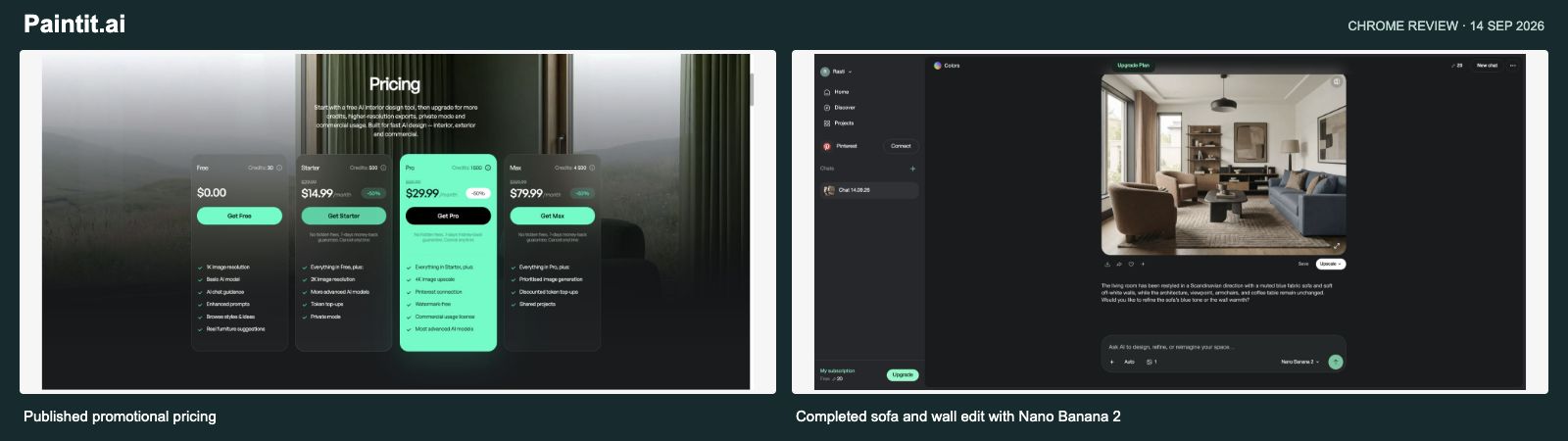
Paintit handled a specific request well in the September trial. Starting from a public gallery living room, I asked for a muted-blue sofa and soft off-white walls while preserving the layout. With Nano Banana 2 selected, the result made those changes and kept the main furniture positions recognizable. The balance fell from 30 to 20 credits.
Its model menu and before/after slider were useful. Those are real overlaps with NovaVerto, so I wouldn’t describe model selection or conversational edits as exclusive features.
What draws me toward NovaVerto is having those capabilities alongside structured room controls. I can make a written request, or go straight to flooring, windows, doors, lighting or a specific room tool. The separate furniture-placement route, catalogue, detected pieces and saved list also make the shopping steps visible.
Paintit’s current pricing page places private mode and 2K on Starter, and watermark-free output, 4K upscale and commercial usage on Pro. Max lists shared projects. Its shopping suggestions are advertised, but I did not test their accuracy. Paintit plan features
I couldn’t complete a signed-in revisit of Paintit on 3 October, so its video and native CAD workflows remain unconfirmed. That is a gap in my check, not a finding that Paintit lacks those features. The completed September edit remains the basis for my firsthand observations.
Why I prefer NovaVerto: I can combine a written edit with task-specific controls and move between design and shopping without changing projects.
Remodel AI: renovation concepts, with less of the full workflow verified
Read the full NovaVerto vs Remodel AI comparison →
Website: remodelai.app
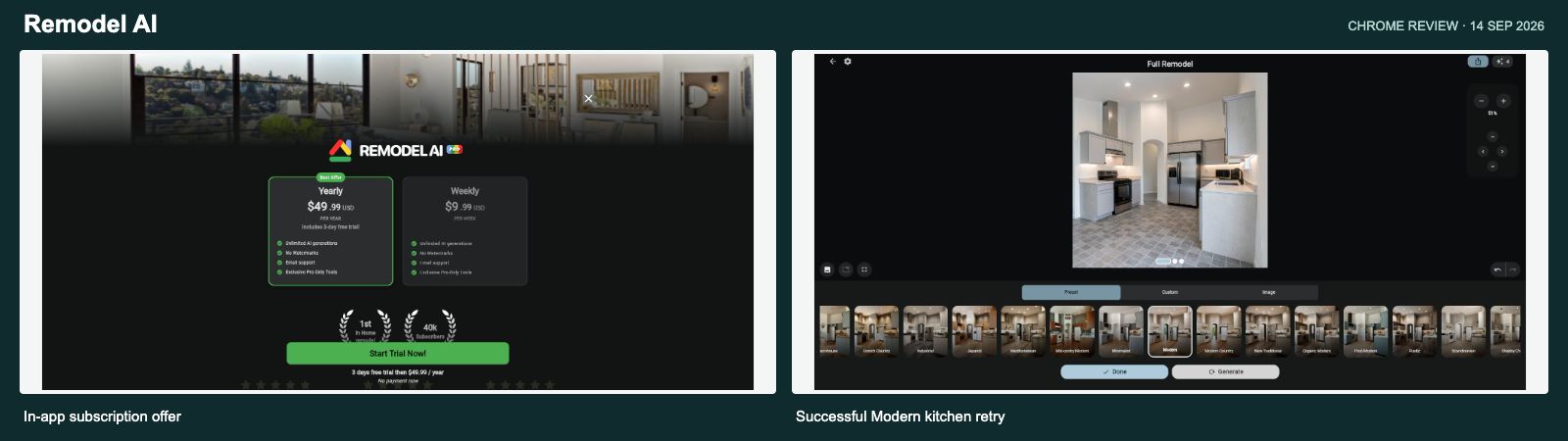
This comparison refers to the ReImage AI product at remodelai.app. The name matters because several products use similar branding.
In my original trial, the app offered eight free generations. A URL import failed, so I used its kitchen sample. The first generation timed out after reducing the counter; the retry produced a useful modern kitchen while keeping the high ceiling, arched opening and main layout recognizable.
The current website advertises interior and exterior remodeling, landscaping, flooring, walls, object replacement and furniture shopping. That is meaningful overlap with NovaVerto. I tested the kitchen generation, not every one of those features. Remodel AI feature list
For a project I intend to revisit, I prefer what I can see in NovaVerto today: an original photo and numbered versions, model and cost controls, focused tool entry points and a saved furniture list. The next step is clear whether I want another style or one small change.
I returned to the existing Free account on 3 October and ran its built-in kitchen sample with the Modern preset. The render completed, I accepted it, and the free-generation counter fell from eight to seven. Full Remodel exposed Preset, Custom and Image tabs, including Choose a Style Image. I also inspected its render-gallery toggle, Undo/Redo and Shop area-selection workflow. I did not establish a persistent numbered history or test product matches. No named-model, video or native CAD control appeared in the editor, tool carousel or account/settings views I checked. My NovaVerto preference is the visible project structure, broader model picker and offer/list controls around those overlapping editing capabilities.
Why I prefer NovaVerto: the current workspace supports the ongoing design process I want, with more of that process directly verified in this review.
MeltFlex: the furnished image was convincing; the shopping step mattered more to me
Read the full NovaVerto vs MeltFlex comparison →
Website: MeltFlex
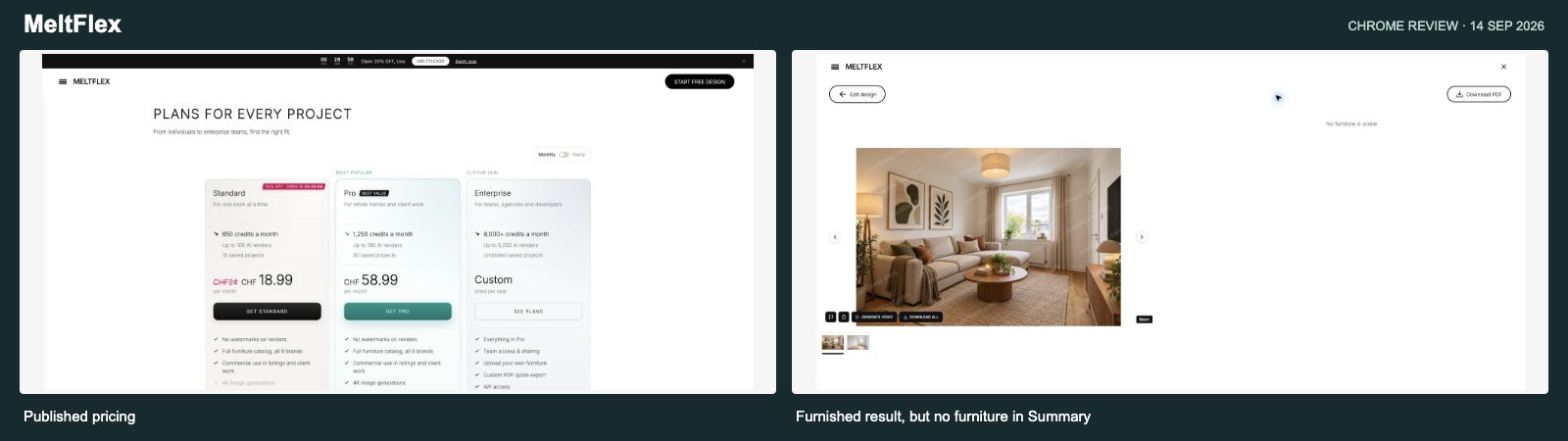
MeltFlex is one of the closer comparisons here. In September, its free-start route accepted the same empty-room photo used in the earlier NovaVerto test. I entered a furnishing request and inspected the model, quality and image-count controls. Submitting led to sign-in, and the photo and prompt survived that step.
The completed Quick / 1K image looked useful: a sofa, coffee table, rug, artwork, curtains and warmer lighting. The window, radiator, right-hand door and wood floor stayed recognizable in the result I inspected. It was watermarked, and five credits remained afterward. I had recorded a displayed setup cost of ten credits, but not the starting balance, so I cannot independently confirm the deduction.
Then I opened Summary. Beside the furnished room, it said “No furniture in scene.” That is the part that matters most to this comparison. I had a design image, but that particular path had not given me a product list I could use. Catalogue cards were visible elsewhere, and a public demo link led to Google Lens. Those observations do not establish that every MeltFlex shopping route behaves the same way.
With NovaVerto, I had already followed product suggestions and saved a sofa to a list. The current workspace makes that next step more explicit through Catalogue, Pieces and List, including offers, prices, a total and area re-selection. Some suggestions in the original test were wrong, so I still check the product carefully. I prefer having an inspectable way to work through those choices around the room.
MeltFlex’s current official pages describe a broad set of room and surface tools, outdoor design, references, video and furniture shopping. Model selection and shopping are therefore overlaps, not features I can fairly call exclusive to NovaVerto. My preference is the combination of the structured brief, task controls and shopping path I could follow through. MeltFlex’s current product scope
Its credit allowances have changed since the original review. The current pricing page lists 490 monthly credits for Standard and 2,250 for Pro. The localized price amount was not exposed in the retrieved page, so I am keeping the old CHF24 / 650-credit calculation explicitly historical. I would not apply that old allowance to a current subscription or compare CHF and USD figures as though they were the same currency. MeltFlex’s current plans
Why I prefer NovaVerto: I’d choose NovaVerto when the aim is to make decisions about my own home, including what to buy. MeltFlex produced a useful room image, but NovaVerto’s tested shopping list and current Pieces, List and editing controls gave me a clearer next step.
Decor8 AI: I could inspect NovaVerto’s working project, while this trial stopped at a subscription
Read the full NovaVerto vs Decor8 AI comparison →
Website: Decor8 AI
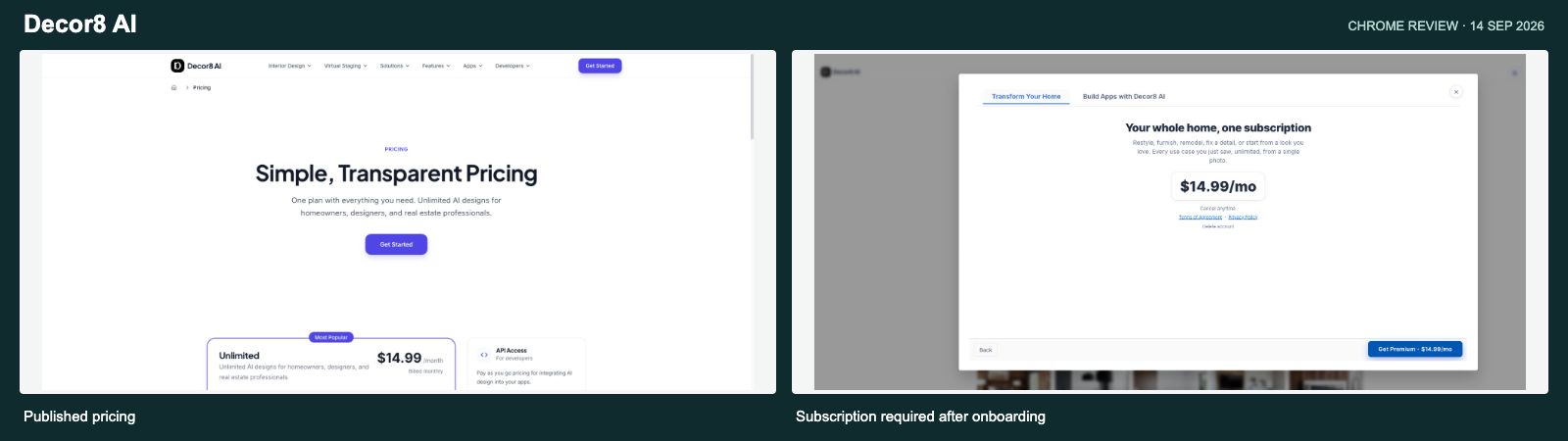
Decor8’s offer is easy to understand on paper: one app subscription for room redesigns and several related design jobs. Its current pages list staging, paint and cabinet visualization, photo enhancement and access across several platforms. Those are useful overlaps with NovaVerto. Decor8’s product features
My September experience was mostly onboarding. Google sign-in worked, then I moved through a long sequence of feature slides. At the end, the app showed a $14.99/month subscription screen. Its exit control said “Close and sign out.” I did not find a free production route through that flow, and I did not buy a subscription.
That means I can describe the access experience, but I cannot give Decor8 an output-quality score. The staged rooms and furniture examples in onboarding were demonstrations. They were not images I had generated with its production tools.
NovaVerto gave me a more useful basis for the decision. I completed a room design, opened product suggestions and saved an item. On the later revisit I could inspect the original, numbered versions, model choices, direct surface controls and the More tools picker around that project. Those are the steps I want to judge before building a longer home-design process around an app.
The product list alone does not settle the comparison for me. Decor8 advertises paint and cabinet changes, while NovaVerto exposes a wider set of directly inspected room-detail entry points. I prefer being able to move from a full redesign to walls, floors, lighting, windows, doors or furniture placement, with the room and its shopping panels still nearby. I did not reach Decor8’s private editor to establish the equivalent arrangement there.
The current pricing page still lists $14.99 monthly for advertised unlimited app designs. That is a different pricing model from NovaVerto’s credits. At ten designs in a month, the subscription would average about $1.50 each; at 100, about $0.15. Those are usage examples, not guaranteed output quality or a fixed per-image tariff. Decor8’s separate API is listed at $0.20 per image. Decor8 pricing
My preference for NovaVerto rests on its demonstrated design-to-shopping workflow and visible run controls. A flat fee on another service does not tell me whether I can make the same furniture, model and revision decisions in the way I want.
Why I prefer NovaVerto: I’d choose NovaVerto for the workflow I could follow through: create a room, compare revisions, refine a detail and save furniture. Decor8’s subscription deserves a look on its own terms, but my trial did not reach a production editor or establish that same path.
Virtual Staging AI: useful listing photos, while my home project needs a longer next step
Read the full NovaVerto vs Virtual Staging AI comparison →
Website: Virtual Staging AI
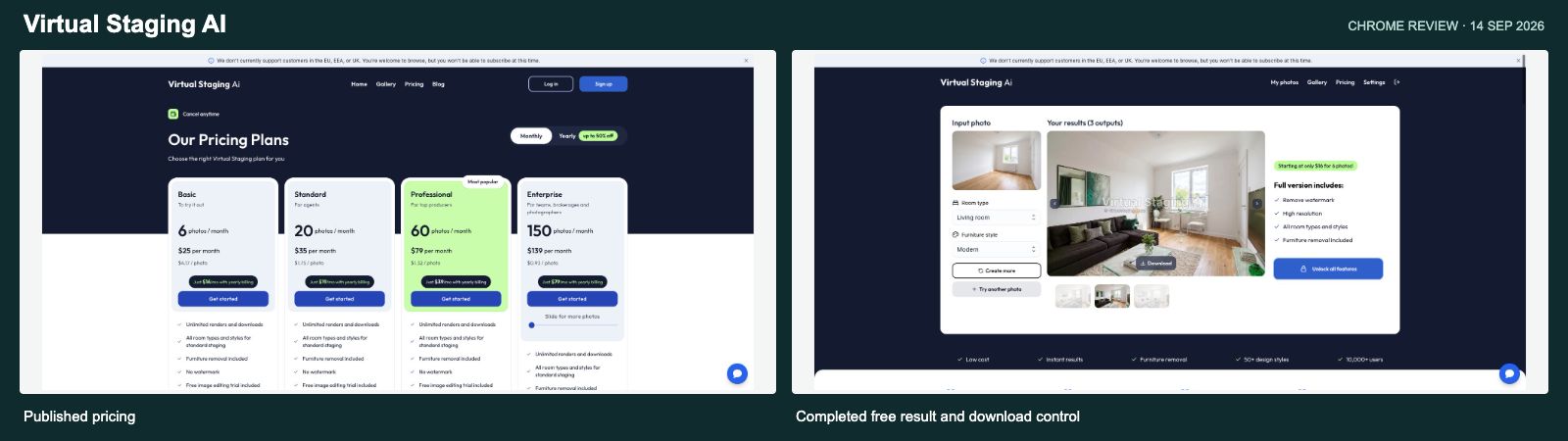
Virtual Staging AI completed its central job in the original trial. I uploaded the shared empty-room photo, chose Living room and Modern, and received three staged variations. The two I inspected kept the main window, right-hand door and floor recognizable while changing the furniture. Switching variations and downloading a result worked.
The free results had a large central watermark. The controls also drew a clear trial boundary: Bedroom and Living room were enabled, with eight styles. Several other room types were upgrade-locked. I would not confuse those free limits with the full paid offering.
I reached a dashboard with folders and an empty photo library after signing in. To start the working trial, I returned to the homepage’s free-upload entry. Once there, the staging flow was straightforward. For NovaVerto, I prefer having New design and the next focused task close to the room I am already developing.
The bigger difference is what I want from the result. For a home I am furnishing, I want to try a specific sofa, adjust the floor, choose another model and keep a product shortlist. NovaVerto puts those decisions around the project. The Virtual Staging AI test established staged images, variation selection and a download; it did not establish an equivalent retailer-shopping or broader renovation workflow.
Virtual Staging AI’s paid plans count new source photos and include repeat renders and downloads. Furniture removal and an image-editing trial are also listed. That is a source-photo allowance, so dividing its monthly fee by photo count does not give a comparable price for one NovaVerto render. Virtual Staging AI’s current plan structure
The retrieved October pricing page showed Basic at $16 per month with annual billing, billed as $192 yearly, for six photos per month. The September monthly offer was $25 for six photos. I am dating those separately: an annual monthly equivalent is not the same purchase as a monthly subscription. I did not revisit checkout.
The September site also displayed an EU/EEA/UK subscription restriction. That message was not present in the October public-page text I retrieved, so I cannot confirm whether the restriction still applies. It is a historical access observation, not a current claim that subscribers in those regions are blocked. Virtual Staging AI website
Why I prefer NovaVerto: I’d choose NovaVerto when I want to keep developing the home after the staged image. Its room tools, model controls, version sequence and shopping panels fit that longer process; Virtual Staging AI’s trial answered the narrower question of how an empty listing might look furnished.
What a NovaVerto render actually costs
The cheapest current NovaVerto render is 65 credits. The current Standard offer is $17.99 for the first month, then $24.99 per month, with 7,000 credits per month. I’m showing both rates so the introductory saving and the ongoing cost are clear. Annual discounts are not used in these calculations. NovaVerto pricing
| Observed setup | Credits | $17.99 first month | $24.99 regular month |
|---|---|---|---|
| NovaVerto AI · cheapest render | 65 | $0.17 | $0.23 |
| Gemini · Fast · 1K | 126 | $0.32 | $0.45 |
| Gemini · Balanced · 1K | 149 | $0.38 | $0.53 |
| Gemini · Best · 1K | 176 | $0.45 | $0.63 |
Calculation: the monthly price ($17.99 introductory or $24.99 regular) ÷ 7,000 × the displayed credit cost. These are allocation estimates, not separate pay-per-image prices. They assume the allowance is fully used and exclude credits spent on other actions. At 65 credits, 7,000 credits cover 107 complete renders with 45 credits left; dividing the full month’s charge across those 107 renders rounds to $0.17 with the introductory offer or $0.23 at the regular price. The introductory rate applies to the first month, not every renewal. Other models, sizes and variant counts change the cost.
With the first-month offer, the cheapest render works out to around 17 cents when the allowance is fully used. I like having that starting point and the freedom to spend more deliberately. A quick design direction and a final client-facing image don’t always need the same model.
The current plan cards list watermark-free renders and API access on Standard. Pro is $49.99 monthly for 13,000 credits and includes 2K/4K output; those resolutions were disabled with a Pro requirement in the free account I inspected. One-off credit packs are also available, with a 30-day validity period. Plans and credit packs
Competitor price context from the earlier review
These regular monthly or one-time prices were recorded in September and are included as historical context, not a fresh checkout quote. No introductory discounts or annual equivalents are used in the unit-cost column. Interior AI and Decor8 AI were reconfirmed on current public pages. MeltFlex’s credit allowances have changed; its old unit price remains historical. The Virtual Staging AI row separates an older monthly offer from the current annual equivalent. HomeDesigns now displays USD pricing that differs from the earlier localized CHF cards.
| Tool | Reference paid entry | Approximate unit cost on that basis |
|---|---|---|
| RoomGPT | $9 / 30 credits; one-time | Basic $0.30; Pro $0.60; Ultra $1.20 |
| Interior AI | $49/month / 1,000 entry-model designs | $0.049 per entry-model design; editing/staging require higher tier |
| REimagine Home | $19/month / 30 legacy credits; Pro was $36 / 200 | Legacy basic image ≈$0.63; Pro basic image $0.18 |
| Collov AI | $27/month / 60 source photos | $0.45 per source photo, with staging variations |
| Spacely AI | $25/month / 500 credits | $0.25 for the observed five-credit action |
| HomeDesigns AI | September: CHF24/month / 100 credits | CHF0.24 per one-credit restyle; October public price shows $22 / 100 |
| Paintit.ai | Regular Starter: $29.99/month / 500 credits | Three-credit Lite ≈$0.18; tested ten-credit edit ≈$0.60 |
| Remodel AI | $49.99/year or $9.99/week offered in-app | No comparable monthly/one-time unit rate verified |
| MeltFlex | September: regular CHF24/month / 650 credits; Quick / 1K displayed 10 credits | Historical ≈CHF0.37 per ten-credit run. Current Standard lists 490 credits; current localized price not established. |
| Decor8 AI | $14.99/month, advertised unlimited app designs; reconfirmed on the October public page | No fixed unit rate: ≈$1.50 at 10 designs/month or ≈$0.15 at 100. Separate API: $0.20/image. |
| Virtual Staging AI | September monthly: $25 / 6 source photos. October page: $192/year, equivalent to $16/month, for 6 photos/month. | September monthly basis ≈$4.17 per source photo, including repeat renders. Not a per-output rendering price. |
Source purchase pages are linked in the individual sections and source notes. Credits, source photos and unlimited allowances represent different units. These figures are not an image-quality ranking.
Why NovaVerto is the one I’d keep open
If I’m working on my living room, I rarely stop after one image. I want to try a warmer palette, keep a piece I already own, change the floor, compare two versions and check whether the furniture makes sense for my budget.
NovaVerto gives those decisions a place in the same project. The new-design flow makes the starting job clear. More tools takes me into a focused task. The model picker gives me options with a visible cost. The shopping panels help turn the design into a shortlist.
That is why it remains my top pick for all-around AI home design in 2026. I would consider the two specialist exceptions above—Collov for repeated listing-photo staging, and Spacely for a SketchUp-centered studio—but for the mix of home-design tasks I care about, I prefer NovaVerto’s connected workflow.
My recommendation: start with your own room, use the 65-credit NovaVerto AI option for an initial direction, then explore the targeted tools and furniture options around that result. The appeal becomes much clearer when you use it for the second and third decision, too. Explore NovaVerto
Sources and what I actually checked
The original browser trials took place in September 2026. For the products included here, completed generations were recorded for NovaVerto, RoomGPT, REimagine Home, Collov, Spacely, HomeDesigns AI, Paintit, Remodel AI, MeltFlex and Virtual Staging AI. Interior AI and Decor8 AI remained behind paid access. The inputs and settings differed, so this is a workflow comparison, not a controlled rendering benchmark.
On 3 October 2026 I inspected NovaVerto’s logged-in project workspace, New project/New run dialogs, Touches and all 28 listed tools, Walls & Paint settings, model picker, Gemini speed and size menus, furniture-placement controls, shopping panels and live pricing. No new NovaVerto render, purchase or public share was submitted during that inspection. Existing generations and saved items provided continuity with the earlier trial. The later free-account pass also completed one new Remodel sample render, described in its section.
I also reopened the competitors’ official product and pricing pages. Where current prices were not visible or no new checkout was inspected, older amounts remain explicitly dated. HomeDesigns’ plain-text plan feature lists do not reliably convey every inclusion/exclusion icon; advanced entitlement is therefore summarized using its plan descriptions and FAQ.
The 3 October free-access pass revisited RoomGPT, REimagine Home, Collov, Spacely and Remodel in signed-in accounts, and HomeDesigns in its no-login free editor. Most gaps left by the September trial are now covered by these free-account observations. Interior AI’s two private checks reached a confirmed subscription gate. Paintit’s signed-in revisit could not be completed. NovaVerto has no native CAD plug-in; its public API and MCP server are the integration routes. These access limits are not evidence of absent features. One Remodel sample generation completed using one free generation; no paid purchase was made.
The MeltFlex, Decor8 AI and Virtual Staging AI sections use the original September account observations and official public pages rechecked on 3 October. They were not part of the free-account revisit above; no new private-account test is claimed for them.
- NovaVerto: tool catalogue, pricing, assistant integration, and the logged-in UI inspection described above.
- RoomGPT: product and credit packs; generation and quality-tier observations from September. Signed-in editor, room/quality selectors and account menu checked on 3 October; zero credits prevented a new result.
- Interior AI: product, modes, FAQ and plan cards; email-login link rechecked on 3 October and opened subscription pricing. No free editor access or completed generation.
- REimagine Home: product workflow and plan differences and credit rules. Signed-in saved project, references, Registry, Shoppable mode and original/result selection checked on 3 October.
- Collov: property-photo tools and plans and staging regeneration terms. Free home, saved result, Before/After, Generation History and Add Furniture checked on 3 October.
- Spacely: Team Canvas and SketchUp extension and plan/tool coverage. Free home, September canvas, result menus, Auto Furnish and Image to Video setup checked on 3 October.
- HomeDesigns AI: tools, plans and FAQ and free editor. No-login free editor and login route checked on 3 October; no private account history established.
- Paintit: current product and plan access and credit rules. October signed-in revisit not completed; completed-use evidence remains from September.
- Remodel AI: ReImage AI product and features and web editor; in-app offer from September. Existing Free account, sample editor, reference and Shop controls checked on 3 October; one built-in sample render completed.
- MeltFlex: current tools and shopping claims, current credits and plan terms; September completed Quick / 1K render, displayed ten-credit setup, catalogue cards and empty furniture Summary recorded in the September trial. October public pages rechecked; private account not revisited.
- Decor8 AI: current features and app subscription and separate API pricing; September onboarding and subscription gate recorded in the September trial. No completed production render. October public pages rechecked; no new private-login test.
- Virtual Staging AI: current staging workflow and source-photo allowances and annual pricing; September dashboard, trial controls, three outputs and download recorded in the September trial. October public pages rechecked; regional subscription availability not freshly established.
Disclosure: I’m a co-founder of NovaVerto. The recommendation reflects my preferences and the workflow we’re building. Observed controls, earlier completed tests and vendor claims are distinguished throughout; access to a tool does not guarantee identical results across photos or models.